Friday, 7 July 2017

Wednesday, 24 May 2017
Evaluation
The projects we where set was to create a website on something we are passionate or interested about. The website I picked to create was a Special Effects Makeup website to display all the types of makeup I create. As I am self-taught when I first started to do makeup I didn't know where to go to look up how to do it so I learned myself. Having a website could help teach others and not many people know information on it.
Before I made my final product, I decided to change the layout to make it easier for people to navigate around the website. This also allowed me to add more pictures and videos onto the pages.
I'm really happy with the way my website turned out and I'm glad I made the changes I did. My website received positive feedback, such as the text and colours fitted with the themes, and I used a wide range of examples of the makeup that I make also including a tutorial video.
The website was actually easier than I thought it would be to make, I think this is because I tried to stay away from Photoshop as much as possible as I still find it hard to understand. My favourite part of my website is my tutorial video as that was the first time I tried that cut before so I completely winged it which I'm glad I did because it shows that all cuts are different and its easy to just go along with any of the cuts. Making it the first time doing that cut could also show that you don't have to do it perfectly for it to work.
Trying to fit the text colour to the back ground and still varying it so you could still read the text was a bit of a struggle, but other than that the website wasn't to difficult to make.
The website is easy for anyone to get there head around. The links take you to the exact place of where they tell you and even on the websites there are examples of work to show that you are in the correct place.
I think with all of my photos and videos the website can be seen as creative. I've tried not to over do it with text as from previous websites this can be seen as boring and unappealing.
I think because my website is horror based it can only bring in a specific type of audience and age. I would say the ages of 15 and above for those interested in how to do Special Effects or want key information.
My video had to be edited down a lot because of it being to long, but as the video included elements that would not make sense to skip out one of the feedback's I got back was to time laps it to speed it up which was what I decided to do for the final video. The rest of the feedback was positive. "Good use of colours" "The video looks awesome but could be shortened" "The makeup looks good when its completed".
Having a video on the website can slow down the loading process but it also gives people a feel for your website also trusting that the website actually works, showing that the products wont harm them and will keep them safe.
If I could do the task again I would create another video displaying a different cut, to show more variety.
I used my phone to store my footage and pictures, but because my pictures where on websites already I knew they would be safe and not disappear. To put them onto my website I just downloaded them onto the computer through a phone cable.
To make my website I used PowerPoint on the computer, to make my videos I used IMovie which was installed on my phone from the Apple App Store, then once I had filmed my video on my phone I transported the video onto the app to edit it. After the edit I saved the video to my camera roll and transport the footage onto the computer from my IPhone. After the footage was on the computer I edited it on Moviemaker to speed it up then saved it onto a document to add to my website.
The person who let me do the makeup on them was over 18 and they where happy with me using them in the footage which made filming easier and quicker as they where free anytime to do it. Also doing it on them a lot previously was more comfortable as they knew the products where safe.
Having done the makeup on the person I used many times before made everything easier as I knew they where comfortable with it and not allergic to any of the products.
When I filmed my videos I filmed them in 3 separate clips. The first one being applying the tissue, the second one applying the paint and the final one a range of montages of the final product. When I was editing the footage I combined them all together to create one video. Then I added the music to the footage. When I saved my footage to my camera roll, from iMovie, I had a choice to save it in low, medium or high quality. I chose to save it on medium quality as low quality could be too blurry but high quality could take to long and use up all my storage. I also had a choice of quality's when saving on Moviemaker and I chose medium quality for the same reasons again.
Thursday, 11 May 2017
Wednesday, 26 April 2017
Results of Research
Monday, 24 April 2017
Monday, 27 March 2017
Proposal and Justifications for Assignment 3
Product
For my website I am planning on making special effects makeup tutorials for beginners as I am self taught and having to learn from scratch can be hard especially if you just want to do it cheaply for fun and not for anything too serious, so having a website you can go to for free and easy tutorials for anyone to do can be a good way to begin.
Audience
My audience will probably be for teenagers as anything too gruesome could scare a young child, also for anyone who is just curious on how stage makeup works.
Brand identity
The purpose of doing this is to help people who maybe want to do special effects makeup as a career but just don't know where to go to start. I want people to be able to come to the website to find out new things that they didn't know or actually attempt to do some makeup.
Use of video
The video I am going to create is going to be a tutorial time lapse of me doing a makeup cut with talking over the top of how to do it and this will probably be on my home page so people can get as feel for the website.
Planning / H&S paperwork needed
For my website to go ahead I will need to fill out legislation forms to ensure I have permission for people to be in my videos and that I will give them credit in my website. I will also need copy right documents so I can have music played in the background, and to make sure no one steals my videos.
Consideration of legislation and its impact
Health and safety will need to be considered so people know the products are safe and also the people I will be using them on need to know that they wont be harmed.
Hardware and software
To film I will probably use my phone as that is by far the easiest way for me to film and then download the video onto the computer to edit or edit it on my phone.
File types
I have pictures on my phone from previous makeup I have done so I will just use them and some more I will create.
Hardware and software
For this I will just upload the video from my phone and edit using Premier Pro or edit it on my phone using IMovie.
For my website I am planning on making special effects makeup tutorials for beginners as I am self taught and having to learn from scratch can be hard especially if you just want to do it cheaply for fun and not for anything too serious, so having a website you can go to for free and easy tutorials for anyone to do can be a good way to begin.
Audience
My audience will probably be for teenagers as anything too gruesome could scare a young child, also for anyone who is just curious on how stage makeup works.
Brand identity
The purpose of doing this is to help people who maybe want to do special effects makeup as a career but just don't know where to go to start. I want people to be able to come to the website to find out new things that they didn't know or actually attempt to do some makeup.
Use of video
The video I am going to create is going to be a tutorial time lapse of me doing a makeup cut with talking over the top of how to do it and this will probably be on my home page so people can get as feel for the website.
Planning / H&S paperwork needed
For my website to go ahead I will need to fill out legislation forms to ensure I have permission for people to be in my videos and that I will give them credit in my website. I will also need copy right documents so I can have music played in the background, and to make sure no one steals my videos.
Consideration of legislation and its impact
Health and safety will need to be considered so people know the products are safe and also the people I will be using them on need to know that they wont be harmed.
Hardware and software
To film I will probably use my phone as that is by far the easiest way for me to film and then download the video onto the computer to edit or edit it on my phone.
File types
I have pictures on my phone from previous makeup I have done so I will just use them and some more I will create.
Hardware and software
For this I will just upload the video from my phone and edit using Premier Pro or edit it on my phone using IMovie.
Wednesday, 22 March 2017
Legislation and Regulations
Health and Safety at Work Act 1974
Often referred to as HASAW or HSW, is an Act of Parliament which is the main piece of UK health and safety legislation. It places a duty on all employers to ensure their safety at work. Health and Safety at Work Act (also referred to as HSWA, the HSW Act, the 1974 Act or HASAWA) is the primary piece of legislation covering occupational health and safety in Great Britain. It is responsible for enforcing the Act and a number of other Acts and Statutory Instruments relevant to the working environment. This is so employees, as well as others on their premises, including temps, casual workers, the self-employed, clients, visitors and the general public stick to the rules and know how to keep themselves and the people around them safe. This will help me become aware of the risks around me.
Health and Safety (DSE) Regulations (1992)
It is a device or equipment that has an graphic display screen. It includes both conventional display screens and those used in emerging technologies such as laptops, touch-screens and other similar devices. Computer workstations or equipment can be associated with neck, shoulder, back or arm pain, as well as with fatigue and eyestrain. Surveys have found that a high proportion of DSE workers report aches, pains or eye discomfort. These aches and pains are sometimes called upper limb disorders (ULDs), which can include a range of medical conditions such as RSI. Most of these conditions do not indicate any serious ill health, but it makes sense to avoid them as far as possible. This is to insure people don't get symptoms such as eye damage or back aches to prevent this they would need to take rest breaks and insure the chair is upright and comfortable for their positioning, also being to hot or cold could effect their health. I need to use this for making my website and to make sure I take plenty of breaks and adjust my work area so I am comfortable and make sure the temperature of the room in just right for working.
Computer Misuse Act (1998)
Often referred to as HASAW or HSW, is an Act of Parliament which is the main piece of UK health and safety legislation. It places a duty on all employers to ensure their safety at work. Health and Safety at Work Act (also referred to as HSWA, the HSW Act, the 1974 Act or HASAWA) is the primary piece of legislation covering occupational health and safety in Great Britain. It is responsible for enforcing the Act and a number of other Acts and Statutory Instruments relevant to the working environment. This is so employees, as well as others on their premises, including temps, casual workers, the self-employed, clients, visitors and the general public stick to the rules and know how to keep themselves and the people around them safe. This will help me become aware of the risks around me.
Health and Safety (DSE) Regulations (1992)
It is a device or equipment that has an graphic display screen. It includes both conventional display screens and those used in emerging technologies such as laptops, touch-screens and other similar devices. Computer workstations or equipment can be associated with neck, shoulder, back or arm pain, as well as with fatigue and eyestrain. Surveys have found that a high proportion of DSE workers report aches, pains or eye discomfort. These aches and pains are sometimes called upper limb disorders (ULDs), which can include a range of medical conditions such as RSI. Most of these conditions do not indicate any serious ill health, but it makes sense to avoid them as far as possible. This is to insure people don't get symptoms such as eye damage or back aches to prevent this they would need to take rest breaks and insure the chair is upright and comfortable for their positioning, also being to hot or cold could effect their health. I need to use this for making my website and to make sure I take plenty of breaks and adjust my work area so I am comfortable and make sure the temperature of the room in just right for working.
Computer Misuse Act (1998)
An Act to make provision for securing computer material against unauthorised access or modification and for connected purposes. The point of this is to keep the privacy of other peoples emails and to stop the risks of being hacked. Its also to keep people aware of keeping their computers unlocked encase of loosing important files which have not been saved.
Copyright, Designs and Patents Act (1998)
Is the current UK copyright law. It gives the creators of literary, dramatic, musical and artistic works the right to control the ways in which their material may be used. In many cases, the creator will also have the right to be identified as the author and to object to distortions of his work. This is created to give full credit to the owner of the image/music. This could impact my website if I want to use a specific image or background music.
Links
http://www.hse.gov.uk/legislation/hswa.htm
http://www.hse.gov.uk/msd/dse/
http://www.legislation.gov.uk/ukpga/1990/18/contents
https://www.copyrightservice.co.uk/copyright/uk_law_summary
Links
http://www.hse.gov.uk/legislation/hswa.htm
http://www.hse.gov.uk/msd/dse/
http://www.legislation.gov.uk/ukpga/1990/18/contents
https://www.copyrightservice.co.uk/copyright/uk_law_summary
Monday, 13 March 2017
Moving Images File Types
What is meant by standard definition?
Standard-definition is resolution that is not considered to be either high-definition or enhanced-definition.
What is meant by high definition?
High-definition is anything of a higher resolution and quality than standard-definition. Any video image with more than 480 horizontal lines is considered high-definition.
What is meant by 4k?
It refers to a horizontal resolution made up of 4,000 pixels.
Vertical resolutions have 2,000 pixels.
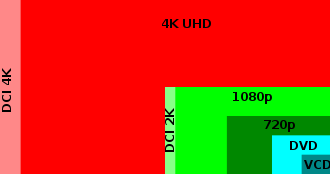 Comparison of common broadcast resolutions
What limitations are there on resolution?
The file sizes can be extremely large taking up a lot of room.
Comparison of common broadcast resolutions
What limitations are there on resolution?
The file sizes can be extremely large taking up a lot of room.
The main advantage of recording with 4K is detail is resolved good. If the final video quality is reduced to 2K from 4K more detail is transferred, however using 4k isn't really necessary if people will just watch on a computer screen as the definition will have slight change but not too much to draw an audience away. in the same the definition of 4k isn't really vital to use as people wont see the deference unless they know what they are look for.
MP4 - Suitable for video streaming over the internet. Less loss of quality. Can be run on the major devices. Not easy to edit or update.
MOV - Multimedia file type.
AVI - Audio Video Interleaved. Supported for all the major platforms. A container to hold videos and audios. Can be very large in size as compared to the other file formats. If compressed beyond certain limits it results in the loss of video quality.
FLV - Flash files can be easily viewed. Easily downloaded. Videos can easily be converted. Expensive and time consuming. Longer wait times to access a web page.
To edit footage we used Adobe Premier Pro and Windows Movie Maker. Adobe Premier Pro was a lot more easier to work with, it was still complex but the footage looked more professional as a final piece, on the other hand, Windows Movie Maker was really hard to use bearing in mind the finished product was no where near as good. With this in mind both editors where the same just Adobe Premier Pro had a better outcome. This all comes down to the pricing of both editor's, Windows Movie Maker comes free with the computer software so its a cheap version of editing so it does its job, just not to well. Adobe Premier Pro was expensive to pay for so it has high expectations and the editing on it is professional and complex to use but once you get the hang of it its worth it.
Standard-definition is resolution that is not considered to be either high-definition or enhanced-definition.
What is meant by high definition?
High-definition is anything of a higher resolution and quality than standard-definition. Any video image with more than 480 horizontal lines is considered high-definition.
What is meant by 4k?
It refers to a horizontal resolution made up of 4,000 pixels.
Vertical resolutions have 2,000 pixels.
Comparison of common broadcast resolutionsThe main advantage of recording with 4K is detail is resolved good. If the final video quality is reduced to 2K from 4K more detail is transferred, however using 4k isn't really necessary if people will just watch on a computer screen as the definition will have slight change but not too much to draw an audience away. in the same the definition of 4k isn't really vital to use as people wont see the deference unless they know what they are look for.
MP4 - Suitable for video streaming over the internet. Less loss of quality. Can be run on the major devices. Not easy to edit or update.
MOV - Multimedia file type.
AVI - Audio Video Interleaved. Supported for all the major platforms. A container to hold videos and audios. Can be very large in size as compared to the other file formats. If compressed beyond certain limits it results in the loss of video quality.
FLV - Flash files can be easily viewed. Easily downloaded. Videos can easily be converted. Expensive and time consuming. Longer wait times to access a web page.
To edit footage we used Adobe Premier Pro and Windows Movie Maker. Adobe Premier Pro was a lot more easier to work with, it was still complex but the footage looked more professional as a final piece, on the other hand, Windows Movie Maker was really hard to use bearing in mind the finished product was no where near as good. With this in mind both editors where the same just Adobe Premier Pro had a better outcome. This all comes down to the pricing of both editor's, Windows Movie Maker comes free with the computer software so its a cheap version of editing so it does its job, just not to well. Adobe Premier Pro was expensive to pay for so it has high expectations and the editing on it is professional and complex to use but once you get the hang of it its worth it.
Monday, 6 March 2017
Creating Vector Graphics Inkscape

This is my new design of the East Norfolk logo I had to create. I created this logo on Inkscape. I didn't really enjoy using Inkscape, however I just stuck to Inkscape instead of changing to Photoshop as I thought I would give it a chance, but I just ended up clicking on everything and hoping for the best. With a lot of messing around I managed to combine two shapes together to make this logo.
Wednesday, 1 March 2017
Creating Vector Graphics
Vector Graphics quality stays the same as you zoom in.
Bitmap Graphics quality pixelates as you zoom in.
From a distance both Graphics look the same however, until you zoom in you can notice the difference.
Vector Graphics are a lot better to use to resize an image as the quality will stay the same over a larger spread of area however, if you were to zoom in on it the picture would just look like a cartoon instead of looking realistic.
Bitmap Graphics quality pixelates as you zoom in.
From a distance both Graphics look the same however, until you zoom in you can notice the difference.
Vector Graphics are a lot better to use to resize an image as the quality will stay the same over a larger spread of area however, if you were to zoom in on it the picture would just look like a cartoon instead of looking realistic.
Monday, 27 February 2017


Wednesday, 22 February 2017
Image Manipulation
25%

50%


125%

150%


The best image size for a computer screen is 25% as its not too big or small and the quality of the picture is still displayed clear.
 low image
 high image
Wednesday, 8 February 2017
Monday, 6 February 2017
Health and Safety
The purpose of the documents is to ensure that everybody agrees with the terms of filming or taking photos on a property. It also helps people to understand their job and makes people aware of what will be going on around them. Having a signed sheet will help for future references if there damage to the property or if someone gets hurt.
These documents are used in a creative industry so they can have the right to film or take photos in an area that belongs to someone. Without these documents people could get into serious trouble and be fined. It also ensures the safety of the people who own or live around the are being filmed.
When making my own website I will need to use these files to get permission to video people and photograph around college. These files will prove that the people on my website don't mind being viewed by the people who visit my website.
These documents are used in a creative industry so they can have the right to film or take photos in an area that belongs to someone. Without these documents people could get into serious trouble and be fined. It also ensures the safety of the people who own or live around the are being filmed.
When making my own website I will need to use these files to get permission to video people and photograph around college. These files will prove that the people on my website don't mind being viewed by the people who visit my website.
Both of these files allow access to the property and to confirm the dates of the photographing/filming. They also confirm the rights to be able to use props on their property and state that any damage will be dealt by them.
This file is to reduce the risk of damage and danger to people. Without this form you would not be able to insure the safety of the workers around the area, having this form will tell the members were the most dangerous props in the area are so they can stay out of the way and avoid them areas.
 Both of these files help the people on set park and give details about their arrival. If they need to get in touch for emergences they also have contact information of relatives and addresses.
 Wednesday, 25 January 2017
Thursday, 12 January 2017

Monday, 9 January 2017
Thursday, 8 December 2016
Mood Board
My mood board is targeted at teenagers and has all the types of brands and places teenagers may wear, buy or play. Including bands and music. The colours are light and pastel fitting both genders. The image behind is blurred so the main focus is on what's on the board. I picked these images because most teens will recognise and use these brands on a daily bases. I wanted them to feel comfortable with the website especially if they will be using it daily.

Subscribe to:
Comments (Atom)