Standard-definition is resolution that is not considered to be either high-definition or enhanced-definition.
What is meant by high definition?
High-definition is anything of a higher resolution and quality than standard-definition. Any video image with more than 480 horizontal lines is considered high-definition.
What is meant by 4k?
It refers to a horizontal resolution made up of 4,000 pixels.
Vertical resolutions have 2,000 pixels.
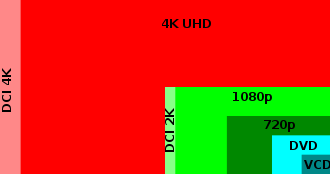 Comparison of common broadcast resolutions
The main advantage of recording with 4K is detail is resolved good. If the final video quality is reduced to 2K from 4K more detail is transferred, however using 4k isn't really necessary if people will just watch on a computer screen as the definition will have slight change but not too much to draw an audience away. in the same the definition of 4k isn't really vital to use as people wont see the deference unless they know what they are look for.
MP4 - Suitable for video streaming over the internet. Less loss of quality. Can be run on the major devices. Not easy to edit or update.
MOV - Multimedia file type.
AVI - Audio Video Interleaved. Supported for all the major platforms. A container to hold videos and audios. Can be very large in size as compared to the other file formats. If compressed beyond certain limits it results in the loss of video quality.
FLV - Flash files can be easily viewed. Easily downloaded. Videos can easily be converted. Expensive and time consuming. Longer wait times to access a web page.
To edit footage we used Adobe Premier Pro and Windows Movie Maker. Adobe Premier Pro was a lot more easier to work with, it was still complex but the footage looked more professional as a final piece, on the other hand, Windows Movie Maker was really hard to use bearing in mind the finished product was no where near as good. With this in mind both editors where the same just Adobe Premier Pro had a better outcome. This all comes down to the pricing of both editor's, Windows Movie Maker comes free with the computer software so its a cheap version of editing so it does its job, just not to well. Adobe Premier Pro was expensive to pay for so it has high expectations and the editing on it is professional and complex to use but once you get the hang of it its worth it.

No comments:
Post a Comment